AI Rendering vs Traditional 3D Software: Which Wins?
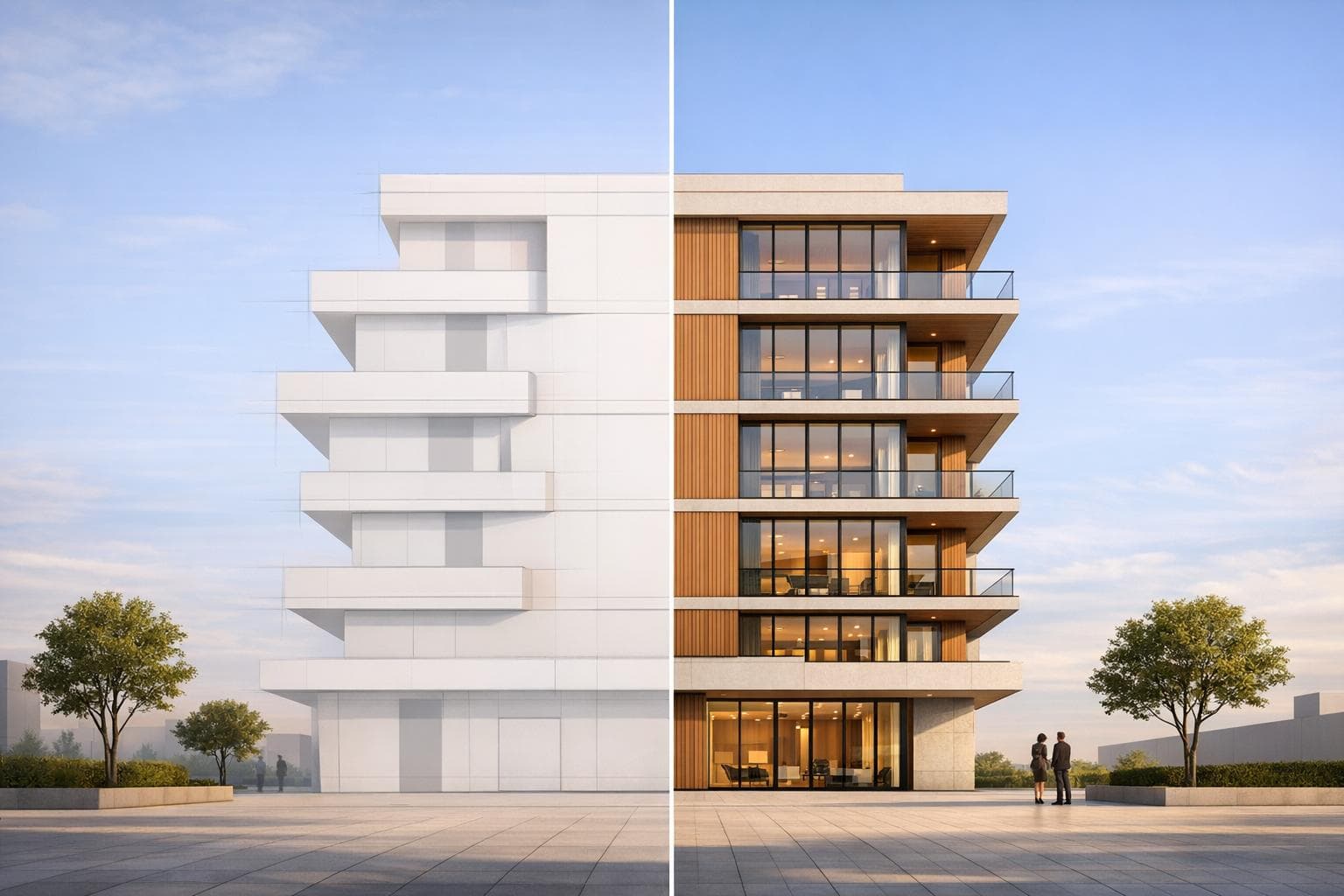
AI rendering and traditional 3D software each serve different needs in architectural visualization. AI rendering is faster and cheaper, producing images in seconds for as little as $0.10 per frame, compared to the $2.00–$3.00 per frame cost of traditional methods. It’s ideal for quick iterations, concept designs, and early-stage exploration. Traditional rendering, however, offers more precision and control, making it better suited for detailed, technical projects like marketing materials or approval documents.
Key Takeaways:
- Speed: AI renders in seconds; traditional methods can take hours per frame.
- Cost: AI is cloud-based and affordable; traditional rendering requires expensive hardware and software.
- Quality: Traditional rendering excels in precision and consistency, while AI focuses on visual appeal but may lack technical accuracy.
- Ease of Use: AI tools are intuitive and require little training, while traditional software has a steeper learning curve.
- Best Use Cases: AI is great for quick ideas and mood boards. Traditional rendering is better for polished, high-detail outputs.
Quick Comparison
| Feature | AI Rendering | Traditional 3D Rendering |
|---|---|---|
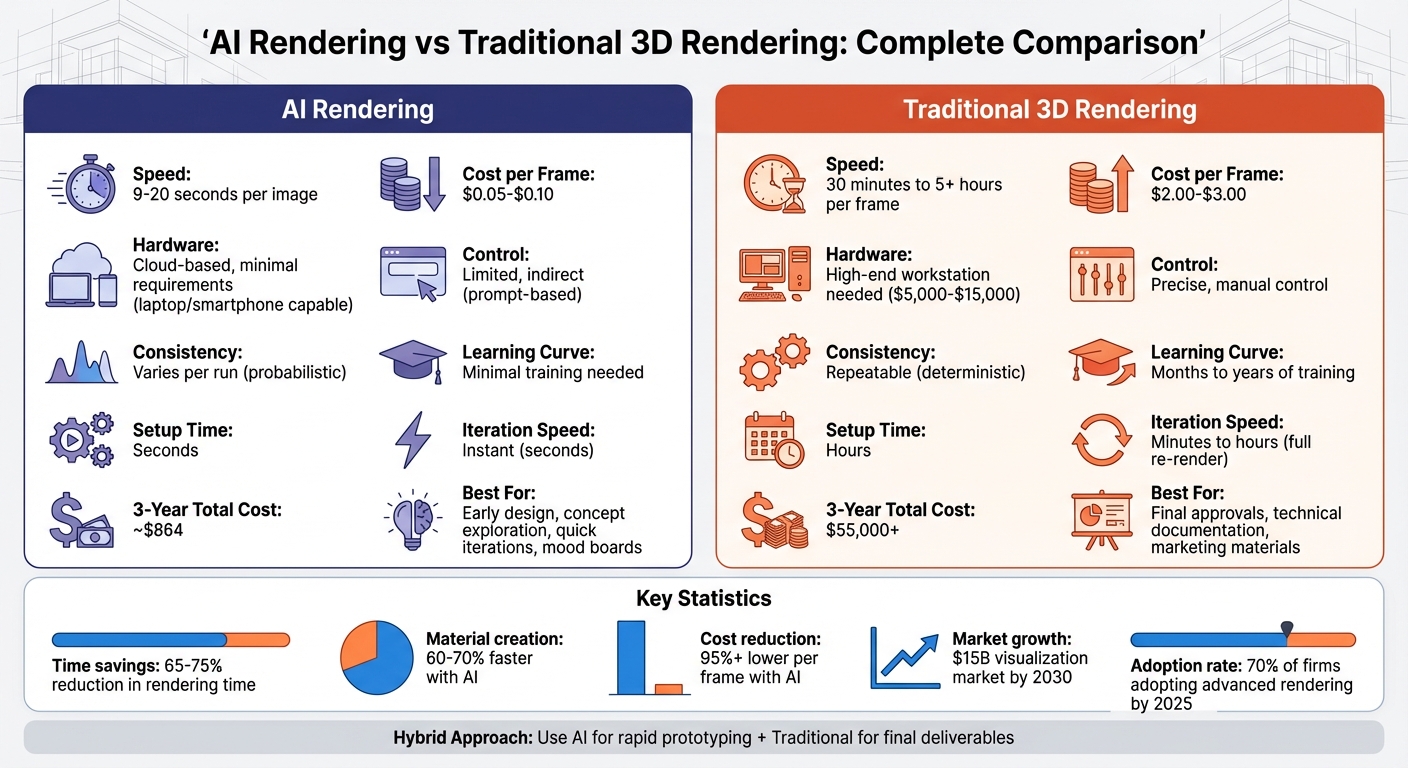
| Speed | 9–20 seconds per image | 30 minutes to 5+ hours per frame |
| Cost per Frame | $0.05–$0.10 | $2.00–$3.00 |
| Hardware | Cloud-based, minimal requirements | High-end workstation needed |
| Control | Limited, indirect | Precise, manual |
| Consistency | Varies per run | Repeatable |
| Best For | Early design, quick iterations | Final approvals, technical work |
For most architects, combining both methods offers the best results. Use AI for rapid prototyping and traditional tools for final, high-detail visuals.
AI vs Traditional 3D Rendering: Speed, Cost, and Quality Comparison
AI Rendering vs Traditional Rendering: What Architects Must Know
sbb-itb-a34ea2e
How AI Rendering Works
AI rendering has changed the game for creating realistic visuals. Instead of manually calculating every light ray or shadow, it uses neural networks trained on millions of images to predict how a scene should appear. This approach leverages advanced deep learning models like Diffusion, Generative Adversarial Networks (GANs), and Neural Radiance Fields (NeRF) to identify and replicate patterns in lighting, textures, and materials.
Here’s how it works: you upload a basic image - whether it’s a JPG, PNG, or even a rough sketch - to a cloud-based platform like Render a House. The AI processes your input, handling everything from modeling to texturing, and produces a photorealistic render in just seconds. Since AI rendering is probabilistic, it predicts scene details based on its training data.
Platforms like MyArchitectAI have already produced over 1.5 million renders, with each taking an average of 9.3 seconds to complete. The secret behind this speed lies in the use of high-performance GPUs hosted in the cloud. This means you don’t need expensive hardware - renders can even be done on a basic laptop or smartphone.
"Not only do you provide spot-on accuracy quickly, but there aren't a ton of hardware requirements which I think is a huge advantage compared to renderers like V-Ray and Lumion." - Luke Vercia, Visualization Artist
The process eliminates tedious tasks like setting up lighting or textures. All you need to do is upload your file, choose your settings, and let the AI handle the rest. These streamlined workflows are what set AI rendering platforms apart.
Key Features of AI Rendering
AI rendering platforms are packed with features designed for speed and ease of use. One of the most popular is one-click rendering - just upload your file, press render, and get results in under 10 seconds. Many tools also include style transfer, letting you apply the look of a reference image (such as a specific lighting style or material theme) directly to your 3D model.
Platforms like Render a House go a step further with adjustable environmental settings. You can switch between day and night lighting or place your design in various contexts, such as a beach, forest, suburb, or countryside. Their Pro plan ($39/month) offers full material customization and unlimited uploads, while the Pay As You Go option ($3/view) allows 10 uploads with unlimited renders per view [renderahouse.com].
Another standout feature is AI upscaling, which boosts low-resolution images to 4K quality without needing a full re-render. Some platforms even offer AI inpainting, letting you edit specific parts of a finished render - like swapping out flooring or furniture - without starting from scratch. This is especially handy for last-minute client changes.
Pricing models are flexible, with subscription and pay-as-you-go options. For instance, ArchiVinci charges $39 for 3 days of unlimited renders or $79 for a month, while MyArchitectAI starts at $29/month for unlimited 4K renders. Compare that to traditional software like 3ds Max, which costs about $2,085 annually, and it’s clear why AI platforms are gaining traction.
Benefits of AI Rendering
One of the biggest perks of AI rendering is how much time it saves. Tasks that once took 8-12 hours can now be completed in just 2-4 hours - a 65-75% reduction. Even material creation time drops from 6-8 hours to 2-3 hours, cutting the process by 60-70%. This makes AI rendering perfect for early-stage design work, where you need to quickly test different lighting or material options.
It’s also far more cost-effective. Traditional rendering costs around $2.00–$3.00 per frame, while AI rendering brings that down to just $0.05–$0.10. Plus, because it’s cloud-based, you don’t need to spend $3,000-$10,000 on a high-end workstation or deal with recurring software license fees.
Another advantage is scalability. Whether you’re rendering one image or a hundred, the cloud infrastructure handles the workload, reducing GPU usage significantly compared to traditional render farms.
"AI rendering technology replaces brute-force computation with intelligent automation." - ArchiVinci
Finally, AI rendering is incredibly easy to use. There’s almost no learning curve, so even small firms or solo designers can produce professional-quality visuals without weeks of training. This levels the playing field, allowing smaller teams to compete with larger studios that have dedicated rendering specialists.
Next, we’ll dive into how traditional 3D rendering methods compare to these AI-driven advancements.
How Traditional 3D Rendering Works
Traditional 3D rendering relies on specialized software like Blender, 3ds Max, or V-Ray. The process starts with 3D modeling, where architects or artists use CAD or BIM tools (such as Revit) to create digital geometry. This phase often includes optimizing meshes to ensure smooth performance.
Next comes UV unwrapping and texturing, a detailed step where 3D surfaces are "unwrapped" into flat 2D maps. These maps allow artists to apply PBR (Physically Based Rendering) materials, which replicate real-world surface properties like albedo, roughness, and metallic finishes. These textures are essential for realistic interactions with light. Once texturing is complete, the lighting setup begins. Artists manually configure lighting - using tools like sun-sky systems, area lights, or IES profiles - to mimic real-world physics and establish the desired mood, shadows, and depth.
The actual rendering process uses algorithms such as ray tracing or path tracing to calculate how light interacts with the scene. Depending on the complexity, rendering can take anywhere from minutes to several hours per frame. Finally, the raw renders undergo post-production in software like Photoshop or After Effects. In this stage, layers like shadows, reflections, and highlights are composited and enhanced with color grading and lens effects to produce the polished final image.
| Stage | Action | Contribution to Final Output |
|---|---|---|
| Modeling | Creating geometry | Establishes the physical structure and scale |
| Texturing | Applying PBR materials | Defines surface properties and light interaction |
| Lighting | Configuring light sources | Creates mood, shadows, and depth |
| Rendering | Computing light behavior | Simulates light bounces and reflections |
| Post-Production | Compositing and grading | Adds final polish and atmospheric effects |
The demand for traditional rendering is growing rapidly. The global market for visualization services is projected to exceed $15 billion by 2030, with hyper-realistic content demand increasing by over 25% annually starting in 2025.
Strengths of Traditional 3D Rendering
Despite its complex workflow, traditional rendering excels in situations that require high precision. One of its key advantages is the absolute control it provides. Every detail - from the angle of a light source to the roughness of a material - can be finely tuned. This level of precision is vital for projects like architectural presentations or engineering documentation, where physically accurate lighting and material simulations are non-negotiable. Additionally, traditional rendering methods are deterministic, meaning identical settings will always produce the same results. This predictability is invaluable for consistency across iterations.
Another benefit is the creation of editable, native 3D files (e.g., SketchUp or FBX), which can be repurposed for further design or used in construction documentation. Traditional tools also offer advanced features that are difficult for AI-driven methods to replicate. Software like V-Ray (around $500+ per year), Corona Renderer (approximately $540 per year), and Lumion (about $1,500 per year) provide capabilities such as subsurface scattering, caustics, and volumetric fog.
"A good render is not made with the most expensive program. A good render is one that has a careful use of composition, light, and storytelling."
– ArchitecturalModels.net
Challenges with Traditional Rendering
The biggest drawback of traditional rendering is time. Setting up a high-quality scene can take hours, and rendering itself may require additional hours - or even days - per frame. This slow "render and wait" process limits the ability to quickly test multiple design options. Moreover, mastering software like V-Ray or Blender takes a significant investment of time, often requiring months or years of dedicated training. Smaller teams may need to hire specialized artists, which increases labor costs.
Hardware requirements are another challenge. Professional workstations typically cost between $3,000 and $10,000, and frequent upgrades - often every 18 months - can add thousands more. Complex scenes demand at least 32 GB of RAM, high-performance multi-core CPUs, and powerful GPUs. The cost of computing time is also significant, with traditional high-resolution rendering costing approximately $2.00 to $3.00 per frame - far higher than the sub-$0.10 per frame often seen with AI-driven alternatives.
"Traditional rendering is powerful but time-consuming. Each frame can take minutes or even hours to complete, depending on complexity."
– ArchiVinci
Extended rendering times also strain hardware, increasing electricity and cooling costs. While traditional methods prioritize precision and control, they often do so at the expense of speed and cost-efficiency.
Speed and Efficiency Comparison
Let’s dive into how AI rendering stacks up against traditional methods when it comes to speed and efficiency.
The biggest difference lies in time. Traditional rendering methods involve extensive manual setup and repetitive iterations. For example, rendering a single 4K image using ray tracing - where light interactions are simulated - can take anywhere from 30 minutes to over 5 hours. What’s more, making even minor tweaks, like adjusting sunlight or changing a material, often means restarting the entire process from scratch.
AI rendering, on the other hand, uses neural networks to predict visual outcomes based on patterns it has already learned. Take ArchiVinci as an example - it delivers high-quality architectural visuals in roughly 20 seconds per view. Across platforms, the average AI rendering time is an impressive 9.3 seconds per image. This speed allows designers to make real-time changes without breaking their workflow.
"D5 has been an immense time-saving tool for us because we demand to do our own visuals. It allows us to tell a cohesive story and gives us more time to design."
– Buck Knitt, RINKA
AI also simplifies the process in ways that go beyond speed. It can interpret basic sketches, text inputs, or simple 3D models to produce polished results. For instance, D5 Render’s "LiveSync" feature integrates with BIM tools like Revit and SketchUp, enabling real-time visualization of changes. Some architects report that AI platforms can cut total rendering times by up to 50%.
Rendering Time Comparison
Here’s a quick breakdown of how AI and traditional rendering compare:
| Workflow Stage | AI Rendering | Traditional Rendering |
|---|---|---|
| Initial Setup | Seconds (prompt/sketch) | Hours (modeling, lighting, etc.) |
| Processing Time | 10 seconds – 2 minutes | 30 minutes – 5+ hours |
| Iteration/Changes | Instant (seconds) | Minutes to hours (full re-render) |
| Final Output (4K) | Under 1 minute | 2 – 10+ hours |
| Cost per Frame | $0.05 – $0.10 | $2.00 – $3.00 |
Platforms like Render a House highlight these advantages, consistently outperforming competitors like Rendair and ReRoom in both speed and cost per frame. This makes AI rendering particularly useful during the early design stages, where testing multiple ideas quickly can help build client trust and speed up decision-making. In fact, data shows that 70% of architecture firms aim to adopt advanced rendering tools by 2025.
Quality and Control Comparison
After looking at speed and efficiency, it’s time to dive into how quality and control stack up between AI rendering and traditional methods.
When it comes to output quality, AI and traditional rendering take very different paths. Traditional software focuses on achieving physical realism by simulating how light behaves in the real world. AI rendering, however, aims for "perceptual realism" - creating images that feel convincing but might include oddities, like windows placed unevenly or balconies that defy basic physics.
Control is another area where the two methods diverge. Traditional 3D rendering gives you precise, manual control over every detail. For instance, you can tweak a curtain wall’s material without affecting anything else in the scene. AI tools, on the other hand, rely on text prompts and reference images to guide the final output. This makes AI great for exploring various styles - shifting from "Scandinavian minimalist" to "cinematic sunset" with a few words - but frustrating when you need to nudge a railing exactly six inches to the left. This indirect control also impacts the consistency of results.
"AI-generated buildings frequently contain impossible geometry, structurally unsound elements, and perspective distortions that trained architects immediately recognize as wrong." – Ravelin3D
One of AI’s biggest challenges is consistency. Because AI works probabilistically, even identical inputs can produce different results each time. This makes it tricky to maintain uniform materials and lighting across multiple views. Traditional rendering avoids this problem because all camera angles are derived from the same 3D model, ensuring consistency.
Output Quality Analysis
Here’s a breakdown of how AI and traditional rendering differ in terms of quality and control:
| Feature | AI Rendering | Traditional 3D Rendering |
|---|---|---|
| Realism Type | Perceptual (convincing appearance) | Physical (mathematically accurate) |
| Control Level | Indirect (prompts/seeds) | Direct (granular/manual) |
| Consistency | Probabilistic (varies per run) | Deterministic (repeatable) |
| Detail Accuracy | May include geometric errors | High (matches 3D model exactly) |
| Customization | High style flexibility but lower detail precision | Slower style changes; total detail precision |
| Best Use Case | Concept art, mood boards, ideation | Final approvals, technical sets, marketing |
| Revision Control | Low (often requires regeneration) | High (precise adjustments) |
For projects that demand technical accuracy - like investor presentations, permitting documents, or marketing materials where every detail needs to be structurally sound - traditional rendering is the safer bet. As Mehmet Karaagac from ArchiVinci puts it:
"If an image must be defended in a review or approval process, CGI is the safer option".
That said, AI has its strengths. Its flexibility can speed up concept development by an impressive 65–75%.
Cost and Hardware Requirements
When comparing AI rendering to traditional 3D software, the difference in budget and hardware needs is striking. Traditional rendering often requires a hefty upfront investment. A professional workstation alone can cost anywhere from $5,000 to $15,000. To handle the demands of traditional rendering, you'll need a high-performance GPU like the NVIDIA RTX 4090, 32–64GB of RAM, and a powerful CPU such as an Intel i9 or Ryzen 9. On the flip side, AI rendering tools are largely cloud-based, meaning they can be accessed on nearly any modern device - whether it's a laptop, tablet, or even a smartphone.
The ongoing costs of traditional software add up quickly. Annual licenses are a major expense: 3ds Max costs around $2,085 per year, V-Ray runs between $466 and $694, and Lumion ranges from $749 to $1,499. Add to that the costs of hardware upgrades, maintenance, and the lost time caused by slower rendering processes. AI rendering, by contrast, operates on a subscription or pay-as-you-go model. For instance, MyArchitectAI charges $29/month for unlimited renders, while Render a House offers flexible options like $3 per view (with unlimited renders for that view) or a $39/month Pro plan that includes unlimited view uploads and full material customization.
"A traditional high-resolution image might cost $2–$3 in compute time. The same output through AI rendering can cost less than $0.10." – ArchiVinci
Over a three-year period, a traditional local setup - including hardware, licenses, training, and maintenance - can exceed $55,000. In comparison, a cloud-based AI rendering solution costs around $864 over the same timeframe.
Cost Breakdown
| Cost Factor | AI Rendering (Cloud-Based) | Traditional Rendering (Local) |
|---|---|---|
| Initial Investment | $0 (uses existing hardware) | $5,000–$15,000+ per workstation |
| Software Cost | $25–$30/month subscription | $500–$2,000+ annual licenses |
| Maintenance | $0 (managed by provider) | ~$3,000 over 3 years |
| Energy Use | Low (short GPU bursts) | High (long computation/cooling) |
| Training Cost | Minimal (intuitive/prompt-based) | ~$5,000 (staff training time) |
| Cost per Frame | Lower operational expense | Higher per-frame computation cost |
| 3-Year Total | ~$864 | $55,000+ |
This comparison highlights how AI rendering transforms a significant capital expense into a manageable operating cost. For smaller firms or startups with tight budgets, this shift is a game-changer. Cloud-based AI platforms eliminate the need for expensive hardware and render farms, making them more accessible and cost-effective.
Render a House capitalizes on this affordability by offering flexible, budget-friendly plans that cater to smaller firms. Buck Knitt from RINKA shared his experience:
"Lumion was very heavy on our machines. We had to spend more money on upgrading hardware just to run the software. With D5 Render, our older machines can handle large models much quicker".
The dramatic savings not only make budgets more predictable but also position AI rendering as a practical solution for firms looking to optimize costs and efficiency. These factors pave the way for understanding how Render a House stands out in the competitive landscape.
Render a House Advantages Over Competitors
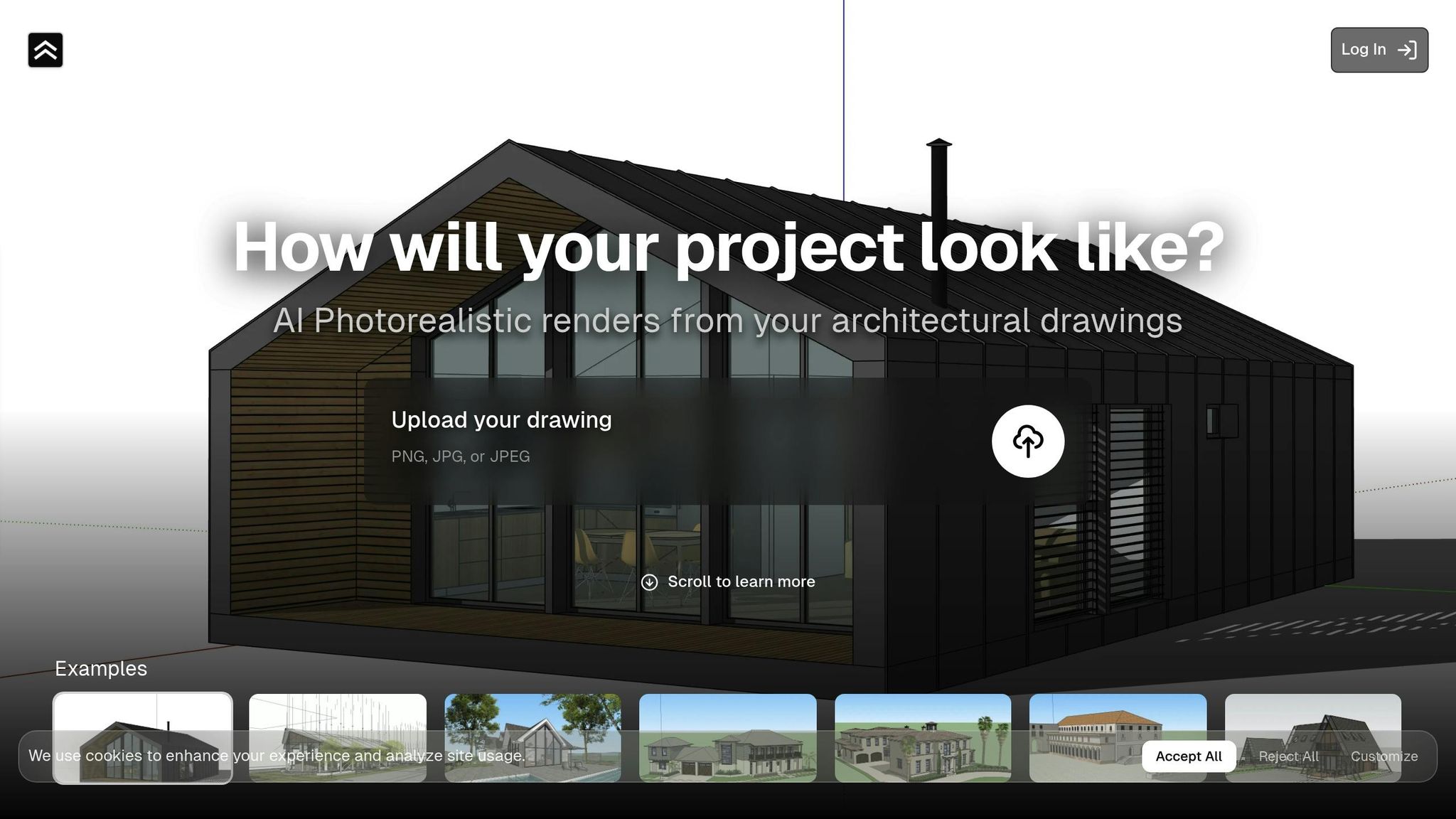
The AI rendering space is packed with competitors like Rendair, ReRoom, ReRender, ArchiVinci, MyArchitectAI, ArchitectAI, PromeAI, D5 Render, and ArchSynth. Yet, Render a House manages to stand out by addressing common frustrations architects face with both traditional rendering tools and earlier AI platforms. These include restrictive credit systems, limited control over materials, and generic outputs. With unlimited rendering options, advanced customization, and personalized support, Render a House carves out a unique position in the market.
Render a House Features
One of the key differentiators is Render a House's unlimited renders per view model. Unlike platforms like Foyr Neo (30–210 credits) or Mnml.ai (1,000–10,000 credits), this platform allows architects to iterate endlessly without worrying about credit limits. Pricing is straightforward: $3 per view on a Pay-As-You-Go basis or $39/month for the Pro plan. This flexibility is especially useful during client meetings, where renders can be created in about 10 seconds, enabling real-time adjustments.
Another standout feature is Pro material customization, which resolves a common flaw in AI rendering: inaccurate representation of materials like metallics, glass, or polished surfaces. Many tools rely on AI's "best guess", often resulting in unrealistic textures. Render a House's Pro plan, however, offers precise control over materials like brushed aluminum or tempered glass. Additionally, the platform provides advanced environment customization and inpainting tools, allowing users to tweak lighting, weather, time of day, and even geographical sun positioning in real time. This level of detail is rare, as most AI tools only offer basic presets or randomized environments.
The platform’s versatility is another plus, supporting inputs like hand sketches, CAD drawings, and existing renders. On top of that, it offers personalized support, which sets it apart from automated, self-service competitors like ArchiVinci or MyArchitectAI.
Competitor Limitations
While Render a House excels in flexibility and material control, many competitors lag behind. Rigid pricing models are a frequent issue. Platforms often rely on credit-based or tiered pricing, which limits iterative workflows. For example, ReRender uses a "Contact for Pricing" model, which lacks transparency and can be inconvenient for individual architects.
Customization is another weak point for many competitors. Tools like ArchitectAI, PromeAI, and ArchSynth typically offer only basic style presets or environments, making it difficult to align renders with specific project needs. Additionally, maintaining consistency across multiple views of the same building is a challenge for many platforms, which can undermine professional presentations.
Support is another area where competitors fall short. Many rely on community forums or automated help systems, leaving architects without quick or specialized assistance. In contrast, Render a House offers personal support and consulting options, particularly through its Studio Consulting plan. For professionals who require immediate answers or tailored advice, this human touch can make all the difference.
With its combination of unlimited iterations, precise material control, and hands-on support, Render a House offers a professional-grade solution for architects who prioritize both speed and quality.
Scalability and Integration
AI rendering platforms bring a clear edge when it comes to handling larger projects and integrating seamlessly into workflows. As projects grow in size and complexity, the ability to scale rendering capacity becomes a game-changer. Thanks to cloud infrastructure, AI rendering platforms can dynamically adjust resources, allowing teams to produce multiple renders at the same time without worrying about hardware constraints or managing queues manually. In contrast, traditional rendering relies on physical render farms, which require manual setup, workload balancing, and ongoing maintenance - all of which add layers of cost and complexity.
Speaking of costs, the earlier comparison of $55,000+ versus $864 over three years highlights the financial impact. But this gap widens further as teams expand. Traditional setups demand more workstations and larger render farms, while cloud-based AI solutions scale effortlessly without the need for additional infrastructure. This scalability doesn't just save money - it also reduces energy consumption, something we'll dive into next.
Deployment and Energy Use
Energy efficiency is another area where AI rendering shines. AI tools can generate images in as little as 30 seconds, compared to the 2 to 8 hours required for traditional local rendering. This drastic reduction in GPU computation time directly translates to lower energy use. Traditional render farms often run at full capacity for hours, consuming large amounts of electricity and requiring constant cooling. AI rendering, on the other hand, uses short GPU bursts and dynamic resource allocation, significantly cutting down on overall energy demands.
"AI rendering is generally faster and more energy-efficient than traditional pipelines. Because renders are generated almost instantly, the total computation time - and therefore energy use - is greatly reduced." - ArchiVinci
AI platforms also set themselves apart with integration capabilities. While traditional tools like V-Ray and Corona rely on well-established plugins for software like Revit, SketchUp, and Rhino, many AI platforms go a step further by offering direct API integrations and smart format conversion. Even though some still depend on uploading static JPG or PNG files, the accessibility of AI platforms is a standout feature. These cloud-based tools work on any device with a web browser, enabling entire teams to collaborate on renders from laptops, tablets, or even smartphones.
Use Cases and Hybrid Approaches
When it comes to balancing speed, efficiency, and quality, combining AI and traditional rendering methods can deliver impressive results. The choice between the two isn’t an either-or scenario. AI shines in the early stages, transforming rough sketches into mood-board visuals that help set the tone for a project. On the other hand, traditional rendering is indispensable for creating detailed, approval-ready documentation that demands precision.
Take real-time client collaboration as an example. AI enables designers to make on-the-fly adjustments during live meetings. Imagine a client requesting a switch from "Scandinavian timber" to "brushed aluminum" - with AI, the material change happens in seconds, keeping the session dynamic and interactive. This eliminates the need for follow-up meetings or disruptions to the workflow. However, for critical deliverables like investor presentations or polished marketing assets, traditional 3D software still holds the advantage, offering consistency and control.
Combining AI and Traditional Methods
Blending AI with traditional rendering creates workflows that leverage the best of both worlds. For instance, the architectural firm Kohn Pedersen Fox (KPF) integrated AI tools like D5 Render into their existing Revit and Rhino workflows. Using features such as "AI Atmosphere Match" and "AI-generated Material Texture Maps", they cut iteration times by up to 80%. Tasks that previously took weeks were completed in hours, allowing the team to handle more projects without compromising on quality.
Professional studios are developing hybrid techniques to streamline their processes. Some use path tracing with AI denoisers to speed up rendering while maintaining physical accuracy. Others generate a neutral "clay render" in traditional software, which AI can then enhance by testing multiple material palettes without requiring re-modeling. A standout example is Ravelin3D, a rendering studio that integrated AI into their workflow for over 950 projects by 2025. They used AI for tasks like mood boards and entourage creation while relying on 3ds Max and V-Ray for core modeling. This approach resulted in a 25-35% acceleration in project timelines, a 60-70% reduction in material creation time, and a 40% cut in the "white clay" approval stage through AI-assisted camera angle optimization.
"The future of visualization lies in hybrid pipelines that blend the strengths of both methods." - Gülsevin Koçak, Architect, ArchiVinci
The real trick is knowing when to use which tool. AI excels at exploring "what-if" scenarios or producing high-volume content where costs need to stay low. Meanwhile, traditional rendering proves better for projects that require precise client revisions - like tweaking the type of brick used - without regenerating the entire image. This division of labor is becoming the norm, with firms reporting 70% fewer revisions and doubling their project capacity when using AI image-to-image workflows for early-stage exploration.
Which Method Works Best for Architectural Visualization?
The best method for architectural visualization depends on your project goals. If you need quick iterations and want to explore concepts rapidly, AI rendering is an excellent choice. It’s particularly effective during the early stages of design or for client workshops. With costs as low as $0.05 to $0.10 per image and near-instant results, AI rendering is a budget-friendly option for fast-paced projects. On the other hand, traditional rendering is indispensable when precision is critical. It’s ideal for planning submissions, technical approvals, or marketing materials where accuracy and detail are non-negotiable.
Budget considerations also play a significant role. Unlike traditional workflows, which often require costly hardware and software, AI solutions are more affordable. For example, D5 Render costs around $360 per year, and cloud-based AI rendering eliminates the need for high-end equipment altogether. This makes AI rendering particularly appealing for smaller studios or individual practitioners looking to minimize upfront expenses.
To illustrate the advantages of AI rendering, platforms like Render a House deliver unmatched speed and flexibility compared to competitors such as Rendair and MyArchitectAI. These tools make it easier to decide which rendering method aligns with your project’s specific needs and deadlines.
Final Comparison and Recommendations
AI rendering shines when you need rapid concept testing, mood boards, or high-volume content on a tight budget. It’s also perfect for exploring "what-if" scenarios during live client meetings. However, one limitation to keep in mind is that changing a single element often requires regenerating the entire image.
For projects that demand pixel-perfect accuracy - such as planning documents, investor presentations, or large-scale prints - traditional rendering remains the better choice. Traditional workflows allow for precise, targeted adjustments without the need to recreate the entire scene. For instance, ZGF Architects reported a 42% reduction in rendering hours and a 19% increase in client satisfaction in 2023 by adopting a hybrid approach, demonstrating the value of combining methods.
A hybrid strategy often delivers the best results. By blending AI and traditional rendering, you can take advantage of both methods. Start with traditional 3D software to establish accurate geometry and spatial relationships. Then, use AI systems for a neutral "clay render" to experiment with materials, lighting, and atmosphere quickly. This approach not only maintains technical precision but also accelerates iteration cycles by 25% to 35%.
FAQs
Will AI renders be accurate enough for permits or approvals?
AI-generated renders are impressively precise and capable of producing photorealistic visuals in no time. That said, when it comes to permits or approvals, these renders often need manual tweaks or validation to align with regulatory requirements and ensure they meet compliance standards. While AI tools are evolving rapidly, traditional methods might still play a role in creating highly accurate and reliable documentation.
How do I keep AI renders consistent across multiple views?
To maintain uniformity in AI-generated visuals across different views, use a seed value during rendering. A seed acts as a fixed reference point for the AI algorithm, ensuring that textures, lighting, and other visual elements remain consistent. Reusing the same seed allows you to produce cohesive visuals with matching details, making it especially useful for fine-tuning designs or presenting a seamless visual story.
What’s the best hybrid workflow using AI and traditional rendering?
The most effective hybrid workflow merges AI tools with traditional rendering techniques to maximize speed, precision, and quality. Start with AI platforms like Rendair AI or ReRoom for fast concept creation. Once the initial ideas are in place, transition to traditional rendering software such as V-Ray or Lumion for fine-tuning and detailed adjustments. This method lets architects quickly experiment with ideas while still achieving highly realistic, polished results through conventional rendering.